Showing posts with label Photography. Show all posts

Monday, April 5, 2010

Going Pro????

So if you ever check out my photography blog this is old news, but my friend Lillian and I hosted a portrait party. . .   and we charged money (not a lot), but still that was a big step for me.  It is one thing to just take someone's pictures and entirely another to get paid to take their pictures.  IT WAS SO FUN!  Here is the cover for the CD's that we made.  (the design came from designaglow.com)  The pictures turned out great! 

Wednesday, March 10, 2010

My cute kids

I love these new pictures I took of my kids while trying out my new blue background. (For info on the background and where I got it check out my photography blog). Here they are cute as can be!
Blue background
Blue background
Blue background
Blue background

and here are even more for you to enjoy!

Monday, June 30, 2008

Family Photos

Family photos are sure an interesting experiment. . . So many personalities in so little space. Trying to capture everyone at just the right moment is a challenge. Enjoy these of the whole gang! For added humor, watch the slide show paying special attention to Catherine's antics. (Catherine is the blond on the right).

Monday, May 12, 2008

I love, love, love, love, love my new camera


That is enough, MOM!!!!! Put the camera away!!!!

What do you think???? I love everything about my new camera, but I especially love the telephoto lens!!!!!!!!!

Friday, December 14, 2007

The third post of Christmas

I must say a lot of you have asked how to make the photo collage that was on our Christmas letter. So here is how. First, you need the photo software PICASA. The good news is that it is free. It is great. It is easy. Click on Picasa and you can download it. Picasa is made by google. It's big strengths are that it searches constantly for new pictures on your computer (in fact it may even find ones you thought were long lost), it is easy to use, and it is super compatible with email (if you have a gmail account) and blogger (if you have a blogger blog). When you open picasa, it will search for all your photos and then look like this.
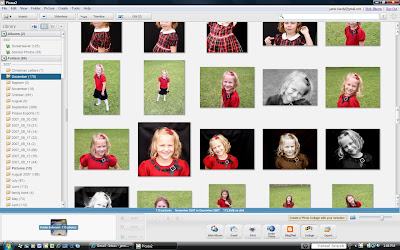


You then select photos 1 at a time (making sure to edit and crop them how you want it). When selected they appear in the tray (the white space in the lower left of the screen). If you want to continue working with a photo you click on hold.


Now, here is the thing when doing a picture grid collage. They are square, and each photo in them will be square and so you need to crop each photo to be a square (if you don't do it, then the computer will do it for you and you may end up with the important parts cropped out). Don't worry though, one nice thing about picasa is that any edits do not change your original and you can always select "undo all edits" and get back to a standard size.


The other important thing about a square picture grid is that it holds 4 (2x2), 9(3x3), 16 (4x4), and 25 (5x5) photos (I am sure you can do more, but that is the biggest I have done. If you do not have enough photos to make the square complete it will duplicate photos to finish it off.


In this next screen shot, you will see 4 photos selected and then I clicked on collage, chose picture grid, and it made it.
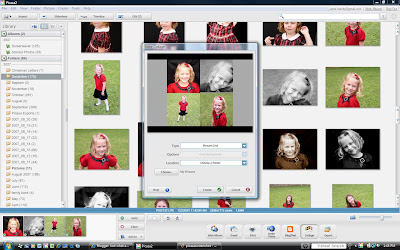


If you like the collage, hit create. If you need to change it, click cancel. Hope that helps! It really is very, very easy to do.

Thursday, September 13, 2007

Bluetooth

Google really is amazing. I looked up "how to get the photos off my cell phone and onto my computer" and found step by step instructions. (For those of you wondering . . . the easiest way is to link your phone to your computer through bluetooth . . . Go to your control panel, search for bluetooth, if you have it, you should see the "Bluetooth connection wizard". Click on it and walk step by step through it. At some point you have to enable bluetooth on your phone. (menu, settings, connection, enable) and then Wahlah! if you go to Windows Explorer and click on computer you will see your hard drives and anything external and there will be the phone and the files called audio, picture, text. Open the picture folder and there are your photos and you then copy them and save them to the computer) Amazing that there are no wires or anything!!! And even more amazing is how bad the pictures turned out. So . . .

The Moral of the Story is . . . don't forget your real camera for important events like the first day of Kindergarten for Catherine or the first day of second grade.

P.S. the reason I detailed out how to get the pictures from you phone onto the
computer???? so that I can do it again!!!!!
Posted by Picasa