Showing posts with label Computers. Show all posts

Wednesday, December 19, 2007

The Sixth Post of Christmas

I have a statcounter on my blog and I thought today I would tell you about it. First let me just say this. . .
I LOVE IT!

It is really amazing the things you can find out. For example it tracks for me how many page loads, unique visitors, and returning visitors I have everyday and I get a cool graph to look at.
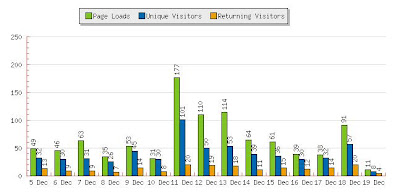
I am cheap so I don't pay for it to store more than 500 entries, which means that a lot of the unique visitors are probably returning visitors, but it has been more than 500 page loads since they last visited so I don't have a record of it anymore. (Also, it blocks my ISP address, so that all of my visits don't skew the results.) On my actual blog, I report total visitors with a little counter. But there is so much more to statcounter than just this . . . OH SO MUCH MORE!!!!


For each individual visitor I can see this. . .
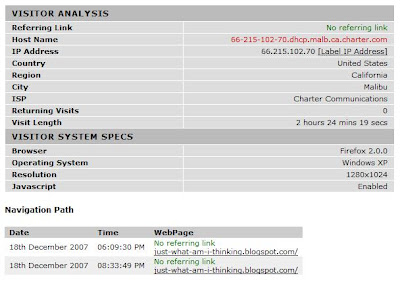
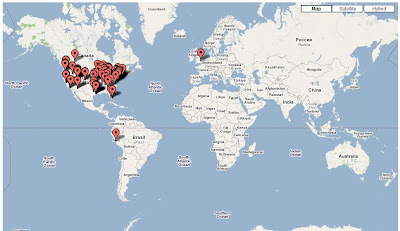
AMAZING huh??? I can see their city and state, I know if they are a MAC or PC user. I know how big their screen is. I can follow their navigation route and see exactly what they looked at and how long they looked at it. I can see what page referred them to my site and what page they left from my site. Check out this .. . . it is a map of all my recent visitors.


But my favorite tool of all is the keyword search info. This lets me know how people find my site using search engines and what they search for. Here is my keyword analysis for today . . .

Isn't that cool? 31 people found my site using search engines. Most of them searching for things related to Hannah Montana Cakes. If I were smart I would start selling them. I could probably sell 20 a day. But then I wouldn't have time to blog, so they will just have to make their own.

So, add a statcounter, you'll be glad!

Monday, December 17, 2007

The Fifth post of Christmas & the first CONTEST on my blog

Now some of you may have noticed that I added ads to my blog. I did it for 2 main reasons.

First I love the blog called pioneer woman that I told you about a couple posts ago -- and she has ads and she does contests and gives away great prizes. She commented that it was because she doesn't want to make money from her blog and it is funner to give it away. I started wondering if I could make any money so that I could give away prizes.

Second, I was just curious how they work, how much do you get for doing absolutely nothing at all.

It works like this, you put the ads on, and you get paid. They won't cut you a check until you have made $100. So this is the reason for the first contest. (It is also a shameless bid to generate comments from all 3 of my faithful readers) (Or maybe there are more of you out there????)

To enter the contest, simply predict the month and year in which I will get my first $100 check. To help you in selecting the time frame I will let you know that after 8 weeks of having ads on my blog I have earned a WHOPPING $2.75. (impressive isn't it???) Also I think you get paid about 20 cents per 500 page loads and about 20 cents per click on a link. (and I cannot click on them).

Now here is the fun part . . . the prize (which of course may be years away) will be $100. If no one guesses the month and year correctly then I will get to keep the money for some other contest which I have not thought of yet.

The Rules . . . Only 1 entry per person. All entries must be recieved before 2008.

Sunday, December 16, 2007

The fourth post of Christmas

How to make a "screen shot". On my few most recent posts I have shown my actual computer screen as a picture on the post. It is pretty easy to do this and I will show you how. First you need to get your computer screen to look exactly like you want it to. Then, find the Print screen button on your keyboard. (mine is abbreviated prt sc). Sometimes you may have to hold down a shift key or a fn key as the print screen key may be shared with other keys. Push it. You will notice nothing at all happens.


Now go to your start menu. Click on start, or the window symbol. Choose All programs, then accessories, then paint. Once paint opens. Press ctrl V. And you should see your screen shot that you took above open into paint. You may then crop it to show only what you really want. When you have it done. Save it (make sure to save it as a .jpeg) and then it is a picture you can use on your blog or when showing someone how to do something. It is especially useful if you are ever teaching a class on computer programs or blogging. Some people need to actually see the screen to be able to understand.


Once in paint you can draw arrows, add text, change colors, spray paint graffiti and do whatever else you may want. The possibilities are endless. Check out what I did.

(also -- you can click on the picture to make it bigger)

Friday, December 14, 2007

The third post of Christmas

I must say a lot of you have asked how to make the photo collage that was on our Christmas letter. So here is how. First, you need the photo software PICASA. The good news is that it is free. It is great. It is easy. Click on Picasa and you can download it. Picasa is made by google. It's big strengths are that it searches constantly for new pictures on your computer (in fact it may even find ones you thought were long lost), it is easy to use, and it is super compatible with email (if you have a gmail account) and blogger (if you have a blogger blog). When you open picasa, it will search for all your photos and then look like this.


You then select photos 1 at a time (making sure to edit and crop them how you want it). When selected they appear in the tray (the white space in the lower left of the screen). If you want to continue working with a photo you click on hold.


Now, here is the thing when doing a picture grid collage. They are square, and each photo in them will be square and so you need to crop each photo to be a square (if you don't do it, then the computer will do it for you and you may end up with the important parts cropped out). Don't worry though, one nice thing about picasa is that any edits do not change your original and you can always select "undo all edits" and get back to a standard size.


The other important thing about a square picture grid is that it holds 4 (2x2), 9(3x3), 16 (4x4), and 25 (5x5) photos (I am sure you can do more, but that is the biggest I have done. If you do not have enough photos to make the square complete it will duplicate photos to finish it off.


In this next screen shot, you will see 4 photos selected and then I clicked on collage, chose picture grid, and it made it.


If you like the collage, hit create. If you need to change it, click cancel. Hope that helps! It really is very, very easy to do.

Thursday, December 13, 2007

The first post of Christmas


On the first post of Christmas . . . I am posting about all my blogging friends. I don't have a links list on my blog because I track everyone through feeds. What are feeds you ask???? Well most blogs have the ability to send out new posts as soon as they are posted to anyone interested. If a blog has that ability it has this symbol on it. If you click on it, it will bring up the "feed" version of that blog. This version has all the important stuff, like links, photos, and text, but omits all the graphic elements (backgrounds, music, etc . . . ). It will ask you if you want to subscribe to this feed. If you select Yes then it will appear in your feed list.


Where is my feed list? Well, In internet explorer there is a little yellow star in the upper left hand corner. It looks like this . . .


If you click on the star, it opens a drop down menu with three headings, favorites, feeds, and history. Favorites is all the sites you have bookmarked. Feeds is all the sites you have subscribed to their feed and history shows you all the sites your computer has visited. (This is how you can spy see where other users have been on the internet -- like to make sure your teen or spouse or child is visiting only acceptable things.) If you click on feeds it will show you your list . . . mine looks something like this. . .


When on this drop down list, you can right click on any of your feeds and select "refresh all" The feed burner will then go by everyone of your subscription feeds and see if anyone has updated them. If they have been updated they turn bold. That way you can see in 2 seconds who has or hasn't updated their blog and then you can click on them and read the updated portion. This saves a PHENOMENAL amount of time. You don't have to keep clicking on people to see if they have made any updates. You don't get sucked into the blogstalking time drain where you just keep clicking and reading and clicking and reading and before you know it you have wasted an entire hour (or several hours, or day).
Anyway it works well for me. I can keep up with everyone I want in a very very very short amount of time.

Thursday, September 13, 2007

Bluetooth

Google really is amazing. I looked up "how to get the photos off my cell phone and onto my computer" and found step by step instructions. (For those of you wondering . . . the easiest way is to link your phone to your computer through bluetooth . . . Go to your control panel, search for bluetooth, if you have it, you should see the "Bluetooth connection wizard". Click on it and walk step by step through it. At some point you have to enable bluetooth on your phone. (menu, settings, connection, enable) and then Wahlah! if you go to Windows Explorer and click on computer you will see your hard drives and anything external and there will be the phone and the files called audio, picture, text. Open the picture folder and there are your photos and you then copy them and save them to the computer) Amazing that there are no wires or anything!!! And even more amazing is how bad the pictures turned out. So . . .

The Moral of the Story is . . . don't forget your real camera for important events like the first day of Kindergarten for Catherine or the first day of second grade.

P.S. the reason I detailed out how to get the pictures from you phone onto the
computer???? so that I can do it again!!!!!
Posted by Picasa

Saturday, September 8, 2007

Webkinz World

Here in Houston, webkinz are a big thing -- some of our friends in other states had not even heard of them. So if you haven't heard of them check out this tour. Each of our girls has one. They earned them at the end of last school year and have spent much of the summer playing on it. They love it. I think it has been a good thing. They have to read and play games and take care of their pet. I think they have actually begun to understand the value of money. In Webkinz world, you do jobs and play games to earn Kinzcash. With this money, you must buy your pet food, clothes, furniture, home decorations, and more. The girls have learned how to save for big purchases (like a fridge or a new room addition on the house). They have learned to budget (if you spend it all on clothes and don't buy food then your pet will not be healthy). All is well in Webkinz world and I love to let them play there . . . that is until this morning when nothing but screams were coming out of the office.

"Where is my money?" Julianne screamed at Catherine.
Catherine just giggled.
"Where is my money?" Julianne screamed even louder. And then Julianne hit Catherine and they were both crying and then I walked in.

After sorting through the yelling and accusations and yelling and accusations and then double checking on webkinz this is what happened. . .

Catherine really wanted to buy a pink frilly fridge for her kitchen to store her food, but this particular fridge cost 680 kinzcash and Catherine did not have it. Knowing full well that it could take weeks for her to earn that much money and knowing she wanted it right now, she decided to log off her account and log in on Julianne's. She saw that Julianne had enough money and so she bought the fridge on Julianne's account and then she mailed it as a gift to her account. The perfect way to get a fridge for free or so she thought.

Apparently, my kids have learned all about money on webkinz, including how to steal it!!!!!

The hard part was that as Catherine was explaining her crime, Trent and I were so amazed that she devised this plan that we had a hard time not laughing about it. Trent said to her, "Catherine, that is stealing. Do you feel bad for stealing from julianne?" She staunchly replied,"NOOOOOO!!!" We both nearly lost it -- we were trying so hard to be serious.

And then I learned a lot more about Webkinz world, for example, one can gift any item -- but not cash. So Catherine cannot send Julianne the money. We had Catherine return the fridge to Julianne who then took it to the W- shop. (the main store, but they also have a pawn shop). We pawned off the perfectly new fridge that cost 680 and only got 340 for it (another good lesson, right?) And now Catherine has to gift Julianne enough items equalling 680 more kinzcash dollars.

Hopefully the webkinz police don't lock up Catherine's webkinz pet. But then it does deserve it . . . maybe she can get deferred ejudication as she is a first time offender. . . or maybe there are some lessons better left unlearned.

Wednesday, July 11, 2007

Where have I been?

Well. . . my hard drive crashed and I am without a computer, a new one has been ordered and hopefully I'll be back. I also have been in Utah for a quick weekend. Trent and I and Adam went to Salt Lake for Trent's grandpa's funeral. You can read his obituary here if you want. It was so nice to be with all our family for that. Since the funeral Trent and I have been reading his personal history -- we did not know he had written one -- it has been fascinating. There is just so much about people that you never know. We just wish we had read it before he was gone so we could ask him questions about it. We are so grateful that he wrote it -- so let this be a lesson to all of us -- keep a journal (or a blog) and write a personal history.

Some time when I actually have a few quiet moments of reflection I will try and write a little more about his Grandpa.